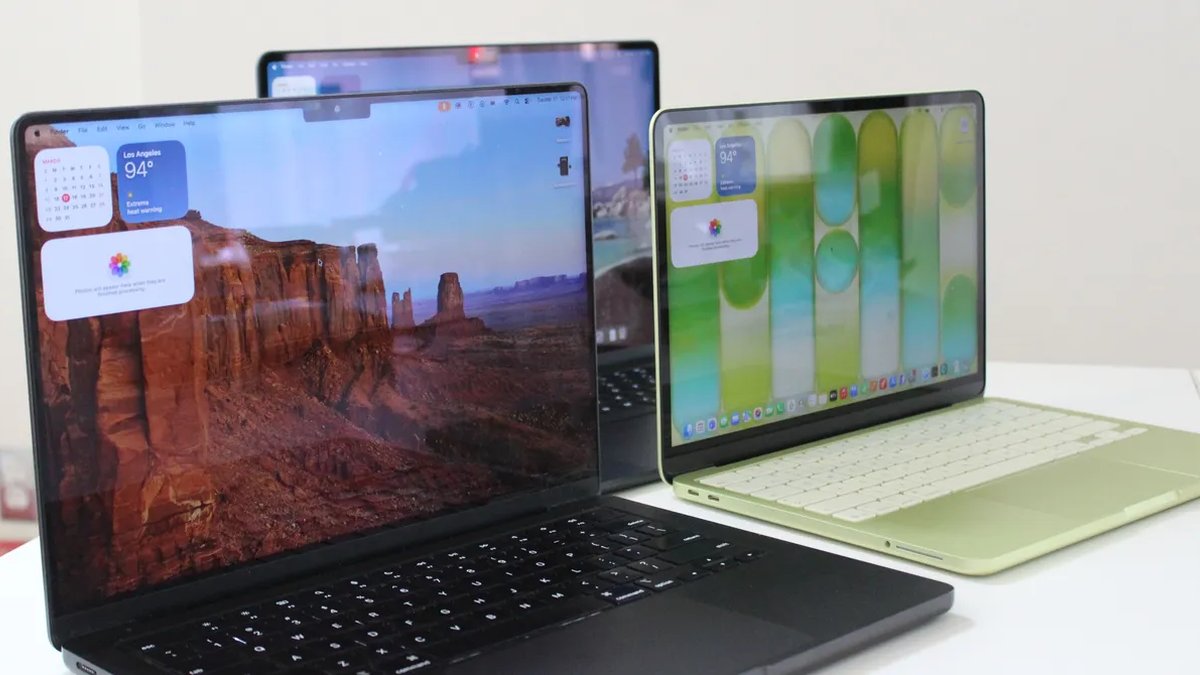
Apple has set the 2026 MacBook lineup. Complete with several MacBook Air and MacBook Pro models, along with the cheaper MacBook Neo, there’s a lot to consider before deciding on the MacBook that best suits your needs.
With a decade of MacBook testing under my belt, I feel confident in my ability to point you in the right direction, regardless of your budgetary restraints and performance needs. Speaking of budget, if you’re hunting for discounts, be aware that Apple recently increased MacBook prices, citing component supply constraints and the high cost of memory and storage chips.
For more recommendations, be sure to check out the rest of our computer buying guides, like the Best Laptops, Best Cheap Laptops, Best iPads, and Best Windows Laptops.
Updated July 2026: I’ve added context behind Apple’s recent price increase for models in its MacBook line.
- Is Now a Good Time to Buy?
- A Breakdown of Each M-Series Chip
- Which MacBooks Are Compatible With macOS 27 Golden Gate?
- Which Macs Support Apple Intelligence?
- Get AppleCare+ to Protect Your Devices
- Take Advantage of Apple’s Education Discounts
- The MacBook for Most People
- The Best MacBook for Students
- The Best MacBook for Pros Only
- The Awkward Middle Child of MacBooks
- Refurbished MacBooks to Consider or Avoid
- Great MacBook Accessories
Is Now a Good Time to Buy?
As of March 2026, Apple has refreshed every MacBook, including the MacBook Air, MacBook Pro, and the new MacBook Neo. That means if you shop now, you’ll get the latest hardware, which may extend its longevity. You’ll also get ongoing software support from Apple.
The problem is that on June 25, Apple dramatically increased the price of all the MacBooks (and iPads) to varying degrees. Here’s a breakdown of the new prices, with increases ranging from $100 to $400:
- MacBook Neo: $699 (up from $599): 14 percent
- MacBook Air (13-inch): $1,299 (up from $1,099): 15 percent
- MacBook Air (15-inch): $1,499 (up from $1,299): 13 percent
- MacBook Pro (14-inch): $1,999 (up from $1,599): 20 percent
- MacBook Pro (16-inch): $2,999 (up from $2,699): 10 percent
It’s very rare for Apple to raise prices suddenly, especially when the change doesn’t accompany a product refresh. What makes this update especially unusual, though, is that only a few months have passed since the MacBook Neo launched. Apple blames the price spikes on memory and storage increases, stating that AI data centers have “created an extraordinary surge in demand" never seen before.
So yes, the better time to buy a MacBook would have been earlier this year. While Apple says that it is “working tirelessly to find solutions,” I wouldn’t expect these prices to come down anytime soon. Predictions around how long this memory shortage will last are measured in years, not months.
One potential update to note: A rumored MacBook launch later this year that would be a major moment. It will reportedly sport an OLED display, a touchscreen-optimized interface, an M6 chip, and a thinner chassis. While the device was once believed to be a forthcoming version of the MacBook Pro, a recent report from Bloomberg discusses an alternative high-end machine, possibly known as a MacBook Ultra. If it comes to fruition, it could be a way for Apple to offer a more expensive MacBook that isn’t purely performance-driven.
One other interesting development in the world of Mac rumors is the forthcoming M6 chip, which will reportedly be the first in the lineup that will be a standalone chip that won’t get an M6 Pro, M6 Max, or M6 Ultra. That would render the current M5 Pro and M5 Max MacBook Pro the most up-to-date models for longer than usual.
A Breakdown of Each M-Series Chip
All of Apple’s processors are scattered throughout different MacBook models, and you can find older models at specific third-party retailers online, either completely new or refurbished. If you do stumble upon its older chips (which came out four years ago), you might be wondering how they compare to other options. Here, get a breakdown of the differences to consider.
M5 Series
M5: The M5 chips are the latest options from Apple, having arrived in late 2025 with the launch of the 14-inch MacBook Pro, iPad Pro, and Vision Pro. The base M5 still has up to a 10-core CPU and 10-core GPU, though there’s also a lower-tier 9-core CPU that’s available on the iPad Pro. The M5 is around 10 to 15 percent faster in CPU performance but also takes a significant step up in GPU, AI workloads, and even storage speed. Like Apple’s mobile chips, the M5 is now also available on the MacBook Air.
M5 Pro: Currently available exclusively on the 14-inch and 16-inch MacBook Pros, the M5 Pro comes with up to an 18-core CPU and a 20-core GPU. The base configuration starts with only a 15-core CPU and 16-core GPU. As with previous generations, the “Pro” chip gets all the same benefits as those in the M5 architecture but adds more cores and improved memory bandwidth. The biggest advantage is in GPU and on-device AI performance. This time around, however, both the M5 Pro and M5 Max also debuted an update: “Fusion Architecture” is a new version of UltraFusion (which was previously used only on the Ultra chips) that combines two dies together across a superfast interconnect.
M5 Max: The M5 Max is the M5 Pro—only with more GPU power. You get the option for up to 40 GPU cores, which puts the MacBook Pro on the level of high-end gaming laptops in terms of graphics performance. Add in the neural accelerators that are now built into each GPU core, and you’ve got one of the most powerful AI laptops on the market. In terms of Apple rankings, it’s only bested in GPU performance by the M3 Ultra, which is currently available only in the Mac Studio.
M4 Series
M4: The M4 originally launched in 2024. It has a 10-core CPU and a 10-core GPU. Apple claims the M4 delivers 1.8 times faster CPU performance and 2.2 times faster GPU performance than the M1. Meanwhile, the neural engine is more than three times faster than the original and twice as fast as the M3. It also starts with 16 GB of unified memory, which helps to power Apple Intelligence (the company’s suite of artificial intelligence features) more smoothly. It’s available on the 14-inch MacBook Pro (2024), iMac (2024), and MacBook Air (13-inch and 15-inch, 2025).
M4 Pro: The M4 Pro has a 14-core CPU (which Apple claims is up to 1.9 times faster than the M1 Pro) and up to a 20-core GPU, with up to 64 GB of unified memory. Built on a second-generation 3-nanometer process, it also supports enhanced GPU features like mesh shading and ray tracing—the latter of which is now twice as fast as on M3 chips. You’ll find it on the 2024 MacBook Pro (14-inch and 16-inch) and Mac Mini (2024).
M4 Max: This chip has a 16-core CPU and up to a 40-core GPU with support for up to 128 GB of unified memory. Apple says the CPU is up to 2.2 times faster than the M1 Max, while the GPU is up to 1.9 times faster. As with the M4 Pro, it packs support for mesh shading and ray tracing. The M4 Max is available as an option on the 2024 14-inch and 16-inch MacBook Pro, and you can also get it as an option in the current Mac Studio.
M3 Series
M3: The M3 was available on the 14-inch MacBook Pro (late 2023), 13-inch MacBook Air (2024), 15-inch MacBook Air (2024), and 24-inch iMac (2023). It packs an 8-core CPU and up to a 10-core GPU with 24 GB of unified memory. When compared with the M1, Apple claimed CPU performance was up to 35 percent faster, and GPU performance was up to 65 percent faster. The company said the CPU and GPU are both 20 percent faster than the M2. As with the M1 and M2, it was great for basic tasks like word processing, sending emails, using spreadsheets, and light gaming. With the 13-inch and 15-inch MacBook Air, you also had support for two external displays (one display with up to 6K resolution at 60 Hz and another with up to 5K resolution at 60 Hz).
M3 Pro: With a 12-core CPU and an 18-core GPU, Apple claimed the M3 Pro's GPU was only up to 10 percent faster than the M2 Pro, making it a marginal upgrade from its predecessor. Compared with the M1 Pro, however, the M2 Pro was up to 40 percent faster in GPU performance and 20 percent faster in CPU performance. It was available on the 14-inch and 16-inch MacBook Pro from 2023. It was the ideal in-between for those who needed a chip that was more powerful than the M3 but wouldn't use the full power of the M3 Max.
M3 Max: This was the next step up from the M2 Max. It had a 16-core CPU, 40-core GPU, and up to 128 GB of unified memory. According to Apple, the CPU performance was up to 80 percent faster than the M1 Max and up to 50 percent faster than the M2 Max. As for GPU performance, it was said to be up to 50 percent faster than the M1 Max and 20 percent faster than the M2 Max. The M3 Max was available on the 14-inch and 16-inch MacBook Pro (late 2023).
M3 Ultra: While the M3 lineup was introduced in 2023, Apple announced an M3 Ultra in 2025. Confusingly, it remains the most powerful chip in the M-series lineup—even better than the latest M4 Max and M5. It has a CPU of up to 32 cores (with 24 performance cores) and a GPU with up to 80 cores. Apple claims it’s up to 2.5 times faster than the M1 Ultra. It also comes with 96 GB of unified memory, with the option to upgrade up to 512 GB, while SSD storage can be increased to 16 TB. This chip is currently available only on the 2025 Mac Studio.
M2 Series
M2: The M2 was an entry-level chip like the M1, with slightly more processing power. It packed an 8-core CPU and up to a 10-core GPU (two more GPU cores than its predecessor), along with support for up to 24 GB of unified memory. Apple said the second-generation chip has an 18 percent faster CPU and a GPU that’s 35 percent more powerful than its earlier version. The M2 was great for daily tasks like word processing and web browsing, but such tasks as editing multiple streams of 4K footage and 3D rendering should be reserved for the M1 Pro or M1 Max (or the next two chips). It was available in the MacBook Air (13-inch, 2022), MacBook Air (15-inch, 2022), and MacBook Pro (13-inch, 2022).
M2 Pro: The M2 Pro was the next step up from the M2. It had up to 12 cores in the CPU and up to a 19-core GPU, with up to 32 GB of unified memory. Apple claimed performance was up to 20 percent faster than with the 10-core M1 Pro and graphics were 30 percent faster. We recommended this chip for intermediate video and photo editors. It was a marginal upgrade compared with the M1 Pro, but it was the best option for those who wanted a more future-proof processor. You could find it in the MacBook Pro (14-inch and 16-inch) from early 2023 and the Mac Mini (2023).
M2 Max: The M2 Max packs up to a 12-core CPU and up to a 38-core GPU (with support for up to 96 GB of unified memory). According to Apple, graphics are 30 percent faster than on the M1 Max. The M2 Max is an excellent choice for those who work with graphics-intensive content, including graphic design, 3D modeling, and heavy-duty video footage. But as with the M2 Pro, it’s an incremental upgrade if you’re coming from an M1 Max. It’s available in the MacBook Pro (14-inch and 16-inch) that came out early in 2023 and the Mac Studio (2023).
M2 Ultra: Successor to the M1 Ultra, the M2 Ultra was available on the second-generation Mac Studio and the Mac Pro (2023). Composed of two M2 Max chips, using Apple’s UltraFusion technology, the M2 Ultra had a 24-core CPU and a GPU configurable with 60 or 76 cores. Apple claimed the CPU delivered up to 20 percent faster performance and a 30 percent faster GPU than the M1 Ultra. This was the chip to get if you were working with extremely heavy-duty content that you believed the M1 Ultra, M2 Pro, or M2 Max simply wouldn't be able to handle. You’d have known if you needed a chip this robust.
M1 Series
M1: For years, Apple continued to sell the M1 MacBook Air through Walmart for just $599, which was a killer price for this laptop. The MacBook Neo has since replaced it, using the A18 Pro iPhone chip. The M1 was the first custom silicon Apple debuted for its MacBook Air in 2020. It has an 8-core CPU and up to an 8-core GPU. Originally, there was support for up to 16 GB of unified memory (RAM) at an extra cost, but nowadays you can only purchase the 8-GB model. It was much faster than any previous Intel-powered MacBook Pro, and it was the practical choice for most people, as it was inside the most affordable MacBook Air you could buy (from third-party retailers). It packed more than enough processing power to get you through common day-to-day tasks and even light gaming. It could also handle more intense jobs, like photo editing.
M1 Pro: From there, the next step up was the M1 Pro. It had up to 10 cores in the CPU and up to a 16-core GPU, with up to 32 GB of unified memory. Apple said the performance and graphics were both twice as fast as on the M1. We found it to be considerably more capable than the base chip, making it ideal for anyone who works heavily on MacBooks for music production or photo and video editing. Only the MacBook Pro (14-inch and 16-inch) from 2021 used this chip.
M1 Max: Like the M1 Pro, the M1 Max had a 10-core CPU but a heftier 32-core GPU (with support for up to 64 GB of unified memory). Apple said it was four times faster than the M1 in terms of graphics. As proved in testing, this chip was extremely powerful and handled every heavy-duty task with ease. It was the go-to choice if you needed a computer that could handle multiple streams of 8K or 4K video footage, 3D rendering, or developing apps and running demos. You probably already knew whether you needed this much power. It was available in the MacBook Pro (14-inch and 16-inch) from 2021.
M1 Ultra: The M1 Ultra was the most powerful of them all. It’s two M1 Max chips connected with a technology called UltraFusion. It packs a 20-core CPU, 64-core GPU (which can be configured with up to 128 GB of unified memory), and a 32-core neural engine—complete with seven times more transistors than the base M1. Even with the M3 Ultra now available, the M1 Ultra remains powerful and a solid option for anyone who needs a heavy-duty processor for working with intense visuals and graphics. It was available only on the first-generation Mac Studio.
Which MacBooks Are Compatible With macOS 27 Golden Gate?
At WWDC 2026, Apple announced the upcoming version of its macOS operating system, known as macOS 27 Golden Gate. The public beta isn’t out yet, but the focus of the update is on beefing up Siri, which is now integrated into Spotlight. It now has a dedicated Siri AI app as well, which functions a bit more like the AI chatbots we’re all so familiar with these days. This all-encompassing perspective of Apple Intelligence is even integrated into Finder and the right-click menu.
Notably, macOS 27 Golden Gate is the first version to no longer support pre-2020 Macs that use Intel processors. The following Mac models will receive Apple’s update to macOS 27 Golden Gate:
- MacBook Air: 2020 and later
- MacBook Pro: 2020 and later
- MacBook Neo: 2026 and later
- iMac: 2021 and later
- Mac mini: 2020 and later
- Mac Studio: 2022 and later
- Mac Pro: 2023 only
The current version of macOS is Tahoe (or macOS 26), which rolled out on September 15, 2025. The software came with a host of new features, including a visual redesign, a spruced-up version of Spotlight, and a new Games app.
All Macs with M-Series chips, going back to the M1 MacBook and M1 MacBook Pro from 2020, are compatible with macOS Tahoe. To see what version of macOS you’re currently running, you can always click the Apple icon in the top left corner of the Menu Bar and select “About This Mac.” If you’re not already on Tahoe, you can head over to System Settings and click on “Software Update.”
MacOS Tahoe 26 is the final version of macOS to support some Intel-based Macs. Specifically, these are the last Intel-powered Macs to get macOS Tahoe:
- MacBook Pro (16-inch, 2019)
- MacBook Pro (13-inch, 2020, Four Thunderbolt 3 ports)
- iMac (27-inch, 2020)
- Mac Pro (2019)
You won’t find these Macs on our recommended list below, but if you already own one, you’ll get one more big update this year, along with three years of security updates.
Which Macs Support Apple Intelligence?
Apple launched the first set of Apple Intelligence features with macOS Sequoia 15.1, including Writing Tools, an overhauled Siri, Smart Replies, Mail Summaries, and Clean Up in Photos. However, Apple Intelligence is exclusive to Macs with an M-series chip. This includes the following:
- MacBook Air (M1, M2, M3, M4, M5)
- MacBook Pro (M1, M1 Pro, M1 Max, M2 Pro, M2 Max, M3, M3 Pro, M3 Max, M4, M4 Pro, M4 Max, M5, M5 Pro, M5 Max)
- iMac (M1, M3, M4)
- Mac Mini (M1, M2, M2 Pro, M4, M4 Pro)
- Mac Studio (M1 Max, M1 Ultra, M2 Max, M2 Ultra, M3 Ultra)
Get AppleCare+ to Protect Your Devices
None of Apple’s MacBooks are cheap, and replacement parts are nightmarishly expensive. Since the entire computer is fully integrated into Apple’s tightly designed aluminum chassis, you’re one coffee spill away from a shockingly large repair bill. This makes Apple’s AppleCare+ worth buying. Remember, you have to purchase it within 60 days of buying your MacBook.
Apple offers the choice between monthly and yearly payments. Both include unlimited accidental protection along with 24/7 telephone support. If your MacBook has screen damage or enclosure damage, you’ll have to pay a $99 service fee, while other accidental damage will cost $299. The monthly payments vary depending on the specific MacBook you buy:
- MacBook Neo: $5 per month or $50 per year
- MacBook Air (13-inch): $7 per month or $70 per year
- MacBook Air (15-inch): $8 per month or $100 per year
- MacBook Pro (14-inch): $10 per month or $60 per year
- MacBook Pro (16-inch): $15 per month or $150 per year
Take Advantage of Apple’s Education Discounts
Apple always offers small discounts on hardware for students and teachers. To access the deals, you simply need to purchase something through Apple’s Education Store, choose the product you want (you should see the discounted pricing), and go through the motions to place the order as you usually would. You don’t need to show any proof that you’re a student at the time of purchase, but you should be honest, as Apple can ask you for verification at a later date. It’s worth noting that the discounts are not as good as what you’ll find on Amazon and sometimes other retailers like Walmart, so be sure to check prices.
The MacBook for Most People
Although the MacBook Neo is more affordable, and the M5 MacBook Pro offers a better display with the far more powerful M5 Pro and Max chips, the MacBook Air remains the model I recommend for most people. The 2026 refresh to the M5 chip isn't particularly exciting in itself, but if you're someone whose livelihood depends sitting in front of a MacBook all day, it's the best option.
The starting price for the 13-inch model is now $1,299, up $200 from its previous price. Notably, for much of last year, you could buy this laptop for as little as $750. That's a painful reality, yes, but it doesn’t change my recommendation about this being the MacBook model most people should buy.
Although the exterior of the MacBook Air hasn’t changed since 2021, Apple has slowly evolved the laptop into something that feels airy and near-weightless. There’s no concern that you’ll have one too many tabs or applications open, eating up all that memory. You won't be sitting around waiting for a file to download, because the SSD is blazing fast. With support for up to two 5K external monitors, the MacBook Air can function as a proper workstation device when using a docking station. The 12-megapixel, 1080p webcam is plenty good for video calls.
What’s most importantly, the M5 is capable of so much more than what most people will ever attempt to do with their MacBook Air. Apple has boosted the GPU by so much over the past generations that the M5 is actually on par with the M3 Pro. You'll probably spend most of your day in browser tabs, Slack, Zoom, office applications, and spreadsheets, but the MacBook Air can just as easily handle Photoshop or Lightroom. You can even dabble in video editing or some light gaming if you want. If you were a professional video editor, you’d likely be bothered by the render times. But if it’s more of a hobby or side project, the M5 MacBook Air likely likely impede your flow. Again, that’s where the MacBook Air really lives up to the idea of being a do-it-all laptop.
As always, there are two sizes, measured diagonally: 13.6-inch and 15.3-inch. Outside the $200 price gap, the size of the screen and the speakers are the only two notable differences between the two. Apple even scales the pixel density up to make sure the display on the 15-inch model looks every bit as sharp. The speakers on the 15-inch model sound incredible, outdone by only the 16-inch MacBook Pro. But choosing between the two sizes really comes down to how you use your laptop. If you have it plugged into an external monitor most days, you may as well get the 13-inch size and save yourself the extra space for when you need to port it around. But if you primarily work on just the laptop itself, having that 15.3-inch screen really makes a difference, especially for more complicated applications or for using Split View.
As you may notice, the M5 MacBook Air now starts with 512 GB of storage. That's twice what previous models packed and helps to rationalize the price gap between the Neo and the Air. Having 512 GB of storage means you won't have to worry about filling up your drive right away. This kind of headroom allows the technology to fade into the background—a design philosophy Apple has always championed.
Read my in-depth comparison between the MacBook Neo and MacBook Air for more information on how they stack.
| Specs |
|---|
| Display: 13.6-inch IPS panel, 2560 x 1664 at 60 Hz |
| Processor: Apple M5 (10-Core CPU/8-Core or 10-COre GPU) |
| Memory: 16, 24, or 32 GB |
| Storage: 512 GB (upgradeable to 4 TB) |
| Thickness: 0.44 inches |
| Weight: 2.7 pounds |
The Best MacBook for Students
The MacBook Neo (7/10, WIRED Recommends) is the new kid on the block, and it had a lot to prove. That’s especially true since it debuted at just $599, an unheard-of price point for Apple laptops—much less than any other model, even before recent price hikes took effect. And even though the MacBook Neo now starts at $699 after those price increases, it remains an aggressively affordable option. To keep pricing low, Apple had to make the following compromises:
- Only 8 GB of RAM
- A18 Pro mobile chip
- No backlit keyboard
- Outdated, slow USB-C ports
- Only supports one 4K external monitor
- No Touch ID (on $599 configuration)
- Slower internal SSD
- Mechanical trackpad (instead of haptic)
That’s a big list, and the memory limitation is the most significant drawback. Unlike on the MacBook Air, you can find the limits of the Neo fairly easily—and not on purpose. If you’re coming from a 16 GB MacBook Air, for example, you likely developed a habit of keeping idle applications or tabs open. On the MacBook Neo, you’ll need to be a bit more aware of what’s open to avoid slowdowns. You’ll also want to be aware of what ports you’re using, since only the rear USB-C port can support an external display. The other USB-C port is only USB 2.0, which is rated for a max of 480 megabits per second. That’s definitely not the one on which you want to transfer files. You may even need to be aware of who you’re sitting next to in a coffee shop if you don’t have the Touch ID model. We haven’t had to worry about these things on laptops for many years.
In exchange, Apple delivers an incredible front-of-screen experience on the MacBook Neo, never before seen on a laptop of this price. The display is sharper and brighter than anything else you can buy for $699, while the keyboard and trackpad are both excellent. Build quality is every bit as strong as any other Apple product, and at 0.50 inches thick, it’s still quite portable to carry around.
On top of all that, there are three really good features the Neo has over the Air. There’s a wider range of color options—and a lot of people will gravitate toward the Neo for that alone. My personal favorite change is the lack of a notch. While the bezels are slightly thicker, I’d still prefer a uniform screen without an ugly notch blocking part of my view. Perhaps most meaningfully, the Neo is reportedly the most repairable MacBook in the lineup, swapping out adhesives for screws on components such as the battery and speakers. This is great for classrooms and businesses hoping to keep fleets of these up to date without contributing as much to the mounting e-waste problem.
For the vast majority of the time, you’ll enjoy using the MacBook Neo and be glad you saved $500. As a parent, this should be the go-to device for high school and college students. It works equally well as a secondary laptop away from your workstation, or a small device for travel.
| Specs |
|---|
| Display: 13.0-inch IPS panel, 2408 x 1506 at 60 Hz |
| Processor: Apple A18 Pro (6-Core CPU/6-Core GPU) |
| Memory: 8 GB |
| Storage: 256 GB or 512 GB |
| Thickness: 0.50 inches |
| Weight: 2.7 pounds |
For Pros Only
The MacBook Pro (8/10, WIRED Recommends) isn’t for you. No, really, it probably isn’t. Even if you have grand plans for your creative career, the MacBook Pro is really not designed for aspirational use. The price alone should key you in on that, as should the capabilities of the MacBook Air. (Sidenote: When I’m talking about the MacBook Pro, I really mean the M5 Pro or M5 Max models. I’ll get to the base M5 MacBook later.)
With that out of the way, having decided that you are the target audience for the MacBook Pro and are willing to pay well over $2,000 to get a laptop worthy of your craft, the M5 Max MacBook Pro is unmatched in its capabilities. As always, the “Max” is primarily about considerably more GPU performance. Along with the option of two extra CPU cores, you can also get up to 40 GPU cores, each core with an AI accelerator built in.
There are three use cases where you can use the new power the M5 Max offers: creative applications, on-device AI processing, and gaming. Whether it’s 3D modeling, video editing, or some other resource-heavy application, the M5 Max MacBook Pro will tear through it. But the AI performance makes a significant jump ahead, too. I tested a 17-billion-parameter Llama-2 model, which was able to run at conversational speed locally, and it was 31 percent faster than running the same model on the M3 Max MacBook Pro.
Then there’s gaming. Nobody is going to buy the MacBook Pro for its gaming prowess alone, but it’s there when you want it. For the first time ever, you can do over 60 frames per second in Cyberpunk 2077 on the Ultra preset with no upscaling whatsoever. That’s an RTX 5070 Ti-level of laptop gaming performance. And unlike laptops that actually have that GPU, the MacBook Pro gets incredible battery life. Lastly, creative professionals will really enjoy the increased storage speed over previous generations.
Everything else about the MacBook Pro hasn’t changed over previous generations. The Mini-LED display is as gorgeous as ever, as are the speakers. You get a solid selection of ports, which includes three Thunderbolt 5 ports that give ample external display support. It’s at the top of its class in nearly every aspect. Like the MacBook Air, it’s been years since the MacBook Pro has received any external changes. Also like the Air, you still have the choice between two sizes that are very similar in performance. Again, the quality of the speakers and the screen size are the main points of consideration.
| Specs |
|---|
| Display: 16-inch Mini-LED XDR panel, 3456 x 2234 at 120 Hz |
| Processor: Apple M5 Pro (14-Core CPU/20-Core GPU) or M5 Max (14-Core CPU/40-Core GPU) |
| Memory: 24 GB (upgradeable to 128 GB) |
| Storage: 1 TB (upgradeable to 8 TB) |
| Thickness: 0.66 inches |
| Weight: 4.7 pounds |
The Awkward Middle Child
Knowing whether to buy a MacBook Pro should be fairly straightforward, if only it weren’t for the M5 MacBook Pro. Offered only in the 14-inch size, this laptop is couched in between the 15-inch MacBook Air M5 and 14-inch MacBook Pro M5 Pro, now starting at $1,999 after Apple’s recent price hike. Of all the price increases, this MacBook Pro model got it the worst. It’s $400 more expensive now, which is a 20 percent increase over its previous price. While the laptop itself is powerful, well-designed, and long-lasting, its position in the lineup is now even more questionable. You only get around a 5 percent increase in performance over the MacBook Air, thanks to the active cooling inside. But that’s hardly a reason to spend hundreds of dollars more.
The only two other reasons to consider the M5 MacBook Pro over the M5 MacBook Air are the ports and the display. The MacBook Pro comes with an extra Thunderbolt port, as well as HDMI. Those are convenient and allow you to charge the MacBook Pro from both the left and right sides (unlike the MacBook Air). There used to be a larger disparity in external display support, but in the latest generations, the MacBook Air has caught up.
The screen is really where the MacBook Pro shines over the Air, though, sporting the same Mini-LED panel you get on the more expensive configurations. It can be cranked up to 1600 nits of peak brightness, which is nice for games, videos, and movies that support HDR. If you plan on watching a lot of movies and shows on your laptop because you don’t own a television, for example, that might be a reason to spend a bit more on the Pro.
The trade-off for buying the MacBook Pro is not only the extra cost, but also the extra size. It’s a thicker, heavier laptop than the MacBook Air. In the end, I think this is the one MacBook that tricks people into buying it because of the “Pro” label in the name. It’s not a bad laptop, but you really need to have a good reason for buying it over the MacBook Air.
| Specs |
|---|
| Display: 14.2-inch mini-LED XDR panel, 3024 x 1964 at 120 Hz |
| Processor: Apple M5 (10-core CPU/10-Core GPU) |
| Memory: 16 GB (upgradeable up to 128 GB) |
| Storage: 1 TB (upgradeable to 8 TB) |
| Thickness: 0.61 inches |
| Weight: M5: 3.4 pounds |
Advice on Buying Older MacBooks
You have to be very careful when shopping for older MacBooks. Don’t get me wrong: Since the introduction of Apple silicon in 2020, almost every MacBook Air and MacBook Pro has been a really good laptop. Never buy a MacBook that predates 2020, regardless of how cheap it is. Trust me.
But even buying an older Apple silicon model requires a discerning eye. Most dated generations of MacBooks are sold only as refurbished or secondhand, meaning there’s an added risk involved. Meanwhile, prices on refurbished models fluctuate frequently, so you’ll need to watch prices closely to get the best deal. I’d advise against using Apple's own refurbished store, as the prices are often not as low as buying new models from third-party retailers like Amazon or Best Buy. However, third-party retailers are always a less risky option than buying used in a secondhand market like Facebook Marketplace or eBay.
With that in mind, here’s what I’d advise regarding buying an older MacBook.
MacBook Air (M4): The previous-generation MacBook Air is a fantastic laptop, but it’s no longer being sold new. However, you can now buy it refurbished for around $1,095. At only $200 cheaper than the M5 model, though, it’s a bit hard to recommend.
MacBook Air (M3): You can get a new M3 MacBook Air on Amazon right now, despite it being two years old. At $1,299, though, it’s certainly not worth buying since that’s the same price as the M5 model.
MacBook Air (M2): Retailers are no longer selling new M2 or M1 MacBook Airs, so they will all be refurbished (or renewed, in Amazon’s lingo). The M2 model was the first to introduce the new chassis design, which is still being used in MacBooks today. Interestingly, you can buy the renewed M2 MacBook Air for the exact same price as the new MacBook Neo right now. Since both come with only 8 GB of RAM, you’ll get a similar level of performance. When that’s the case, I’ll always recommend buying new, with the hopes that Apple will support it longer.
MacBook Air (M1): With the introduction of the Neo, refurbished M1 MacBook Air models have sunk to pretty dramatic lows. You can currently buy a refurbished M1 for $400 or less. While the M1 MacBook Air gets you a backlit keyboard, the new MacBook Neo is certainly the more handsome and portable of the two. Still, if you need something fairly limited and are willing to risk buying refurbished, I can see why an Apple silicon MacBook for less than $400 has its appeal.
MacBook Pro (14-inch, M4): This is no longer being sold new, but you can buy the refurbished model for $1,599. Earlier this year, you could have bought the brand-new M5 model for less than this. Sigh. Don’t buy it, though, as the M4 Pro is available for less.
MacBook Pro (M3 Pro or M3 Max): Given the prices to which these refurbished models have dropped, they may be worth considering, particularly for people who want a bit more performance than they’d get from a MacBook Air.
At this point, I do not recommend buying refurbished MacBook Pros from the M2 or M1 generation. I haven’t seen deals strong enough on them to justify purchasing something that old.
Great MacBook Accessories
There are a lot of MacBook accessories to enhance your experience, including cases and chargers for on-the-go and peripherals to use at your desk. Below, I’ve highlighted some of my top recommendations, but you can find more in my Best MacBook Accessories guide.
Native Union Laptop Stand for $80: I’ve tried many, many laptop stands, but I haven’t liked any as much as I like the Native Union Laptop Stand. It’s not only sturdy and highly adjustable, but it’s also the most beautifully designed laptop stand I've ever used.
Logitech Casa Pop-Up Desk for $180: This is a great solution if you constantly work on the go but prefer using an external keyboard and mouse with your laptop. The Casa Pop-Up Desk comes with a keyboard and trackpad that fit into a compact case that doubles as a laptop stand.
Apple Magic Keyboard with Touch ID (USB-C) for $146: Crafting a workstation around your MacBook? A stand-alone keyboard is a nice upgrade. It comes equipped with a Touch ID button, so you can use it to log in, download apps, and pay for purchases. It also has the same function row keys as M-series MacBooks, including a dedicated “Do Not Disturb” button, playback buttons, and a Mission Control key.
Bellroy Laptop Caddy for $49: While most laptop sleeves can handle the basics of keeping your MacBook safe in your purse or bag, I like that this laptop caddy offers a place for essentials like your power adapter, an iPad, or any other recommended accessories on this list.
Plugable USB-C Hub Multiport Adapter for $50: If you’re buying a MacBook Air, you’ll likely need some type of port adapter or hub at some point. The Plugable USB-C Hub Multiport Adapter is the best I’ve tested, offering just about every port you could need, along with enough power delivery to charge almost any MacBook. The metal chassis is a fitting friend for your MacBook in looks, too.
Baggu Puffy Laptop Sleeve for $34: This puffy laptop sleeve is adorable and protective. The Velcro enclosure is also strong enough that you won’t have to worry about your laptop accidentally sliding out.
Dell 27 Plus 4K for $299: Still think 4K monitors are expensive? This fantastic 4K monitor from Dell stomps those myths out of existence. It has a clean aesthetic, great image quality, and even a 120-Hz refresh rate. There’s a reason the Dell 27 Plus 4K (9/10, WIRED Recommends) is our most highly recommended product in my Best Monitors guide. It doesn't support USB-C for single-cable charging, though, so if you’re coming from a MacBook Air, you might want to pay the extra $70 to upgrade to this model.
BenQ 5K Monitor (MA270S) for $1,000: If you own a MacBook Pro and need a monitor that can match the colors and sharpness of that screen, this BenQ monitor is right up your alley. Not only is it 5K, but it also comes with a specific color mode that precisely matches the color temperature of your MacBook to help you avoid discrepancy. If you’re a content creator, photographer, or video editor, this is one of the very best options out there.
Power up with unlimited access to WIRED. Get best-in-class reporting and exclusive subscriber content that's too important to ignore. Subscribe Today.
Facts Only
* MacBook Neo price increased by 14 percent, from $599 to $699.
* MacBook Air (13-inch) price increased by 15 percent, from $1,099 to $1,299.
* MacBook Air (15-inch) price increased by 13 percent, from $1,299 to $1,499.
* MacBook Pro (14-inch) price increased by 20 percent, from $1,599 to $1,999.
* MacBook Pro (16-inch) price increased by 10 percent, from $2,699 to $2,999.
* M5 chips are available in MacBook Air models.
* The M5 Pro includes the Fusion Architecture.
* M4 and M5 chips support Apple Intelligence features requiring M-series hardware.
* macOS 27 Golden Gate no longer supports pre-2020 Macs using Intel processors.
* Apple Intelligence features are exclusive to Macs with M-series chips.
Executive Summary
Full Take
Sentinel — Human
The text reads like an expert technology reviewer and guide offering personal advice based on deep familiarity with Apple silicon history and current market pricing, heavily layered with subjective recommendations.